Schema validation
This is the documentation of the schema validation implementation as proposed in the Github discussion #1451.
The new schema validation is a versatile, fast, safe and declarative way to enforce constraints on need items and their relations in Sphinx-Needs. It is supposed to replace the legacy needs_constraints and needs_warnings configuration options in future. See Migration from legacy validation for details on how to migrate.
Important
Strong typing system: Sphinx-Needs features a comprehensive strong typing system that extends throughout the entire application. This includes:
Early type validation: All need fields are validated against their defined types, with support for field defaults, link defaults, Dynamic functions, variants, needextend. Needs that do not conform to their types are not created and lead to a warning.
JSON export: Generated needs.json files honor the user provided types
Multi value extra options: Array types for extra options are fully supported
Gradual migration: Existing projects can migrate step-by-step to the new system, with string types as default for untyped fields.
Safety: The new type system core makes it possible to configure fields individually. Users may decide not to disallow variants / dynamic functions / defaults or needextend on certain fields. This makes it possible to build a system in which the RST code is the only source of truth. (Look at the constructor of
sphinx_needs.needs_schema.FieldSchema.)
This represents a major improvement in data integrity and developer experience compared to the previous string-typed system.
Type system
The typing system features the following types for need fields:
Primitive types:
string,boolean,integer,numberList types:
array[string],array[boolean],array[integer],array[number]
The schema validation implementation is based on JSON schema, therefore JSON schema types are used for types and schema description.
Type representation in Python is as follows:
JSON
string-> PythonstrJSON
boolean-> PythonboolJSON
integer-> PythonintJSON
number-> PythonfloatJSON
array-> Pythonlist
Schema configuration
The schema is configured in multiple places:
needs_fields is the place to add new extra options that are then available for all need types. The type information for each field is globally set here, so it is valid for all the usages of that field for any need type. This is required for a coherent data storage, as it would be expected by a database system. If different data types are needed for the same option, it means creating a new extra option with a different name and type.
Further, the
schemafield inneeds_fieldsalso supports setting global schema constraints for that option, that will be checked for each need type. E.g. minimum/maximum for integers, enum for strings, etc.needs_extra_links is the place to add new link options that are then available for all need types. The type for link fields is pre-set to
array[string], as links are always lists of need IDs. Theschemafield inneeds_extra_linkssupports setting global schema constraints for that link option, that will be checked for each need type. E.g. minimum/maximum number of links or need id patterns. The schema defined here always runs on unresolved local needs, i.e. links are a list of IDs.core fields such as
type,id,title,statusortagshave pre-defined types that cannot be changed.needs_schema_definitions and needs_schema_definitions_from_json are the places to define more complex validations that can act on need types, collection of fields and resolved network links. It is based on JSON schema, but adapted and used in a way so it fits perfectly in the Sphinx-Needs ecosystem.
Important
Type information and automatic injection
JSON schema requires type information in all schemas to actually perform validation. For example, validating an integer minimum constraint on a string field does not make sense, but, depending on the implementation, JSON schema might not complain about this.
Therefore, Sphinx-Needs automatically injects the type information from needs_fields
and needs_extra_links (as well as core field definitions) into the
needs_schema_definitions when type information is not explicitly provided in the
schemas.json file. If type information is provided in schemas.json, it must match the
definition from needs_fields or core fields.
The next sections guides through an example and how do use the type and schema system to enforce constraints on need items and links between them.
Modeling example
Imagine the following modeling of need items:
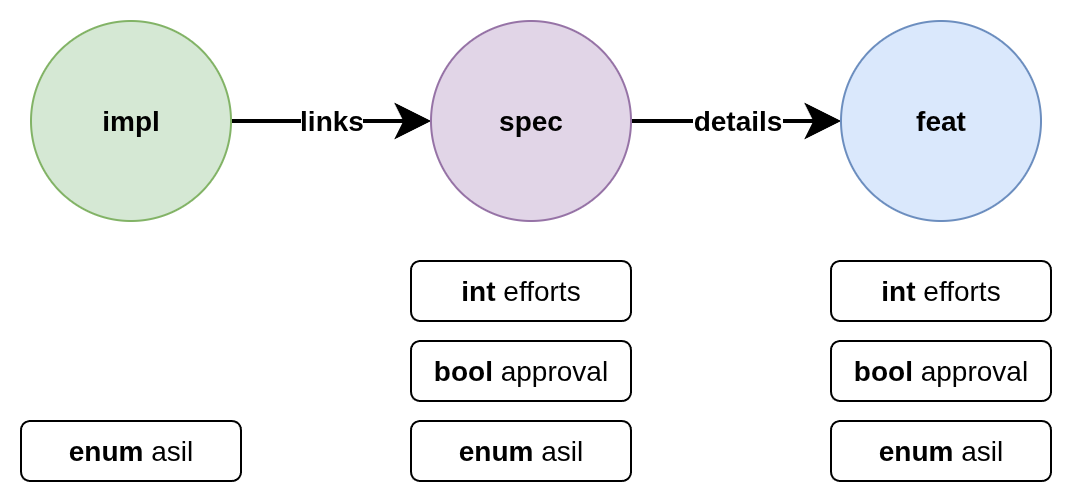
There are a few things to note about this setup:
the extra options
efforts,approvalandasil(for Automotive Security Integrity Level) are typedthe assigned extra options differ between need types
the fields may be optional for a need type, required or even not allowed
some validation rules are local to the need itself, while others require information from other needs (network validation)
the needs link to each other in a specific way, so a safe
implcan only link to a safespecwhich can only link to a safefeatitem
The schema validation in Sphinx-Needs allows you to define declarative rules for validating need items based on their types, properties and relationships.
This includes both local checks (validating properties of a single need) and network checks (validating relationships between multiple needs). In local checks links to other needs are just a list of string need IDs while network checks run on the data of the linked need.
The distinction is especially important in an IDE context, where local checks can provide instant feedback while network requires building the full network index first.
Note
The full example for below configuration can be found in the tests. It can directly be executed with:
tests/doc_test/doc_schema_example $ uv run sphinx-build -b html . _build
Here are the full example files as a reference:
conf.py
project = "Docs modeling example"

extensions = ["sphinx_needs"]

templates_path = ["_templates"]
exclude_patterns = ["_build", "Thumbs.db", ".DS_Store"]

needs_from_toml = "ubproject.toml"

html_theme = "alabaster"
index.rst
Docs Example
============

.. feat:: Feature
   :id: FEAT_SAFE
   :asil: B

.. spec:: Specification
   :id: SPEC_SAFE
   :efforts: 20
   :approval: yes
   :asil: B
   :details: FEAT_SAFE

.. impl:: Implementation
   :id: IMPL_SAFE
   :asil: B
   :links: SPEC_SAFE
ubproject.toml
"$schema" = "https://ubcode.useblocks.com/ubproject.schema.json"

[needs]
id_required = true
id_regex = "^[A-Z0-9_]{3,}"
build_json = true
schema_definitions_from_json = "schemas.json"
schema_debug_active = true
# schema_debug_ignore = []

[needs.fields.efforts]
description = "FTE days"
schema.type = "integer"
schema.minimum = 0

[needs.fields.asil]
description = "Automotive Safety Integrity Level"
schema.type = "string"
schema.enum = ["QM", "A", "B", "C", "D"]

[needs.fields.approval]
description = "Approval flag"
schema.type = "boolean"

[[needs.extra_links]]
option = "links"
outgoing = "links"
incoming = "linked by"
schema.maxItems = 1

[[needs.extra_links]]
option = "details"
outgoing = "details"
incoming = "detailed by by"
schema.maxItems = 1

[[needs.types]]
directive = "feat"
title = "Feat"
prefix = "Feat_"

[[needs.types]]
directive = "spec"
title = "Specification"
prefix = "SPEC_"

[[needs.types]]
directive = "impl"
title = "Implementation"
prefix = "IMPL_"

# link modeling impl -[links]-> spec -[details]-> feat
schemas.json
{
  "$defs": {
    "type-feat": {
      "properties": {
        "type": { "const": "feat" }
      }
    },
    "type-spec": {
      "properties": {
        "type": { "const": "spec" }
      }
    },
    "type-impl": {
      "properties": {
        "type": { "const": "impl" }
      }
    },
    "safe-feat": {
      "allOf": [
        { "$ref": "#/$defs/safe-need" },
        { "$ref": "#/$defs/type-feat" }
      ]
    },
    "safe-spec": {
      "allOf": [
        { "$ref": "#/$defs/safe-need" },
        { "$ref": "#/$defs/type-spec" }
      ]
    },
    "safe-impl": {
      "allOf": [
        { "$ref": "#/$defs/safe-need" },
        { "$ref": "#/$defs/type-impl" }
      ]
    },
    "safe-need": {
      "properties": {
        "asil": { "enum": ["A", "B", "C", "D"] }
      },
      "required": ["asil"]
    },
    "high-efforts": {
      "properties": {
        "efforts": { "minimum": 15 }
      },
      "required": ["efforts"]
    }
  },
  "schemas": [
    {
      "severity": "warning",
      "message": "id must be uppercase with numbers and underscores",
      "validate": {
        "local": { "properties": { "id": { "pattern": "^[A-Z0-9_]+$" } } }
      }
    },
    {
      "id": "impl",
      "select": {
        "$ref": "#/$defs/type-impl"
      },
      "validate": {
        "local": {
          "properties": {
            "id": { "pattern": "^IMPL_[a-zA-Z0-9_-]*$" },
            "links": {},
            "asil": {}
          },
          "unevaluatedProperties": false
        }
      }
    },
    {
      "id": "spec",
      "select": {
        "$ref": "#/$defs/type-spec"
      },
      "validate": {
        "local": {
          "properties": {
            "id": { "pattern": "^SPEC_[a-zA-Z0-9_-]*$" },
            "efforts": { "minimum": 0, "maximum": 20 },
            "approval": {},
            "asil": {},
            "details": {}
          },
          "unevaluatedProperties": false
        }
      }
    },
    {
      "id": "feat",
      "select": {
        "$ref": "#/$defs/type-feat"
      },
      "validate": {
        "local": {
          "properties": {
            "id": { "pattern": "^FEAT_[a-zA-Z0-9_-]*$" },
            "efforts": { "minimum": 0, "maximum": 20 },
            "approval": {},
            "asil": {},
            "details": {}
          },
          "unevaluatedProperties": false
        }
      }
    },
    {
      "id": "spec-approval-required",
      "severity": "violation",
      "message": "Approval required due to high efforts",
      "select": {
        "allOf": [
          { "$ref": "#/$defs/high-efforts" },
          { "$ref": "#/$defs/type-spec" }
        ]
      },
      "validate": {
        "local": {
          "required": ["approval"]
        }
      }
    },
    {
      "id": "spec-approval-not-given",
      "severity": "warning",
      "message": "Approval not given",
      "select": {
        "allOf": [
          { "$ref": "#/$defs/type-spec" },
          { "$ref": "#/$defs/high-efforts" }
        ]
      },
      "validate": {
        "local": {
          "properties": {
            "approval": { "const": true }
          },
          "required": ["approval"]
        }
      }
    },
    {
      "id": "safe-spec-[details]->safe-feat",
      "message": "Safe spec details safe feat",
      "select": {
        "$ref": "#/$defs/safe-spec"
      },
      "validate": {
        "network": {
          "details": {
            "contains": {
              "local": {
                "$ref": "#/$defs/safe-feat"
              }
            },
            "minContains": 1,
            "maxContains": 1
          }
        }
      }
    },
    {
      "id": "safe-impl-[links]->safe-spec",
      "message": "Safe impl links to safe spec",
      "select": {
        "$ref": "#/$defs/safe-impl"
      },
      "validate": {
        "network": {
          "links": {
            "contains": {
              "local": {
                "$ref": "#/$defs/safe-spec"
              }
            },
            "minContains": 1
          }
        }
      }
    }
  ]
}
Field configuration
Above modeling can be reached with the following ubproject.toml configuration:
"$schema" = "https://ubcode.useblocks.com/ubproject.schema.json"

[needs]
id_required = true
id_regex = "^[A-Z0-9_]{3,}"
build_json = true
schema_definitions_from_json = "schemas.json"
schema_debug_active = true
# schema_debug_ignore = []

[needs.fields.efforts]
description = "FTE days"
schema.type = "integer"
schema.minimum = 0

[needs.fields.asil]
description = "Automotive Safety Integrity Level"
schema.type = "string"
schema.enum = ["QM", "A", "B", "C", "D"]

[needs.fields.approval]
description = "Approval flag"
schema.type = "boolean"

[[needs.extra_links]]
option = "links"
outgoing = "links"
incoming = "linked by"
schema.maxItems = 1

[[needs.extra_links]]
option = "details"
outgoing = "details"
incoming = "detailed by by"
schema.maxItems = 1

[[needs.types]]
directive = "feat"
title = "Feat"
prefix = "Feat_"

[[needs.types]]
directive = "spec"
title = "Specification"
prefix = "SPEC_"

[[needs.types]]
directive = "impl"
title = "Implementation"
prefix = "IMPL_"

# link modeling impl -[links]-> spec -[details]-> feat
Primary type definition
The configuration needs_fields is used to define the primary type information for fields. This type information is globally valid for all usages of that field across any need type.
For primitive types (string, integer, number, boolean):
[[needs.extra_options]]
name = "efforts"
schema.type = "integer"

[[needs.extra_options]]
name = "approval"
schema.type = "boolean"
For array types, both the array type and the item type must be specified:
[[needs.extra_options]]
name = "tags"
schema.type = "array"
schema.items.type = "string"

[[needs.extra_options]]
name = "priorities"
schema.type = "array"
schema.items.type = "integer"
Type constraints
Additional schema constraints can also be defined here, which will be validated globally:
[[needs.extra_options]]
name = "asil"
schema.type = "string"
schema.enum = ["QM", "A", "B", "C", "D"]

[[needs.extra_options]]
name = "efforts"
schema.type = "integer"
schema.minimum = 0
schema.maximum = 100
The same constraints as defined in Supported data types and constraints can be used here.
Type information in schemas.json
The schemas.json file (or needs_schema_definitions) also requires type information for
validation, but:
If type is not specified in schemas.json, it will be automatically injected from the
needs.extra_optionsdefinition (or from core field definitions for built-in fields)If type is specified in schemas.json, it must match the type defined in
needs.extra_options(or the core field definition)
This ensures type consistency across your entire configuration while reducing duplication. The injection to the schema rules is required for safe JSON schema validation.
Schemas configuration
Schemas can be configured in two ways: directly in the conf.py file or loaded from a separate
JSON file.
JSON file configuration (recommended)
The preferred approach is to define schemas in a separate JSON file and load them using the needs_schema_definitions_from_json configuration option:
# conf.py
needs_schema_definitions_from_json = "schemas.json"
Then create a schemas.json file in your project root. The file structure contains two top-level keys:
"$defs": (Optional) Reusable schema components referenced via$ref(see Schema definitions ($defs))"schemas": (Required) Array of validation schema definitions
Basic example:
{
  "$defs": {
    "type-spec": {
      "properties": {
        "type": { "const": "spec" }
      }
    }
  },
  "schemas": [
    {
      "severity": "warning",
      "message": "id must be uppercase",
      "select": {
          "$ref": "#/$defs/type-spec"
      },
      "validate": {
        "local": {
          "properties": {
            "id": { "pattern": "^SPEC_[A-Z0-9_]+$" }
          }
        }
      }
    }
  ]
}
Each schema in the schemas array must be contained within this top-level structure.
See Schema file structure reference for complete file format details.
Full version for above example modeling
{
  "$defs": {
    "type-feat": {
      "properties": {
        "type": { "const": "feat" }
      }
    },
    "type-spec": {
      "properties": {
        "type": { "const": "spec" }
      }
    },
    "type-impl": {
      "properties": {
        "type": { "const": "impl" }
      }
    },
    "safe-feat": {
      "allOf": [
        { "$ref": "#/$defs/safe-need" },
        { "$ref": "#/$defs/type-feat" }
      ]
    },
    "safe-spec": {
      "allOf": [
        { "$ref": "#/$defs/safe-need" },
        { "$ref": "#/$defs/type-spec" }
      ]
    },
    "safe-impl": {
      "allOf": [
        { "$ref": "#/$defs/safe-need" },
        { "$ref": "#/$defs/type-impl" }
      ]
    },
    "safe-need": {
      "properties": {
        "asil": { "enum": ["A", "B", "C", "D"] }
      },
      "required": ["asil"]
    },
    "high-efforts": {
      "properties": {
        "efforts": { "minimum": 15 }
      },
      "required": ["efforts"]
    }
  },
  "schemas": [
    {
      "severity": "warning",
      "message": "id must be uppercase with numbers and underscores",
      "validate": {
        "local": { "properties": { "id": { "pattern": "^[A-Z0-9_]+$" } } }
      }
    },
    {
      "id": "impl",
      "select": {
        "$ref": "#/$defs/type-impl"
      },
      "validate": {
        "local": {
          "properties": {
            "id": { "pattern": "^IMPL_[a-zA-Z0-9_-]*$" },
            "links": {},
            "asil": {}
          },
          "unevaluatedProperties": false
        }
      }
    },
    {
      "id": "spec",
      "select": {
        "$ref": "#/$defs/type-spec"
      },
      "validate": {
        "local": {
          "properties": {
            "id": { "pattern": "^SPEC_[a-zA-Z0-9_-]*$" },
            "efforts": { "minimum": 0, "maximum": 20 },
            "approval": {},
            "asil": {},
            "details": {}
          },
          "unevaluatedProperties": false
        }
      }
    },
    {
      "id": "feat",
      "select": {
        "$ref": "#/$defs/type-feat"
      },
      "validate": {
        "local": {
          "properties": {
            "id": { "pattern": "^FEAT_[a-zA-Z0-9_-]*$" },
            "efforts": { "minimum": 0, "maximum": 20 },
            "approval": {},
            "asil": {},
            "details": {}
          },
          "unevaluatedProperties": false
        }
      }
    },
    {
      "id": "spec-approval-required",
      "severity": "violation",
      "message": "Approval required due to high efforts",
      "select": {
        "allOf": [
          { "$ref": "#/$defs/high-efforts" },
          { "$ref": "#/$defs/type-spec" }
        ]
      },
      "validate": {
        "local": {
          "required": ["approval"]
        }
      }
    },
    {
      "id": "spec-approval-not-given",
      "severity": "warning",
      "message": "Approval not given",
      "select": {
        "allOf": [
          { "$ref": "#/$defs/type-spec" },
          { "$ref": "#/$defs/high-efforts" }
        ]
      },
      "validate": {
        "local": {
          "properties": {
            "approval": { "const": true }
          },
          "required": ["approval"]
        }
      }
    },
    {
      "id": "safe-spec-[details]->safe-feat",
      "message": "Safe spec details safe feat",
      "select": {
        "$ref": "#/$defs/safe-spec"
      },
      "validate": {
        "network": {
          "details": {
            "contains": {
              "local": {
                "$ref": "#/$defs/safe-feat"
              }
            },
            "minContains": 1,
            "maxContains": 1
          }
        }
      }
    },
    {
      "id": "safe-impl-[links]->safe-spec",
      "message": "Safe impl links to safe spec",
      "select": {
        "$ref": "#/$defs/safe-impl"
      },
      "validate": {
        "network": {
          "links": {
            "contains": {
              "local": {
                "$ref": "#/$defs/safe-spec"
              }
            },
            "minContains": 1
          }
        }
      }
    }
  ]
}
Benefits of JSON File Configuration:
Declarative: Schema definitions are separate from Python configuration
Version control: Easy to track changes to validation rules
IDE support: ubCode can read the JSON file
Python configuration (alternative)
Alternatively, schemas can be configured directly using the needs_schema_definitions
configuration option in conf.py. The structure is identical to the JSON file format:
needs_schema_definitions = {
  "$defs": {
    # reusable schema components
    "type-spec": {
      "properties": {
        "type": { "const": "spec" }
      }
    }
  },
  "schemas": [
    {
      "severity": "warning",
      "message": "id must be uppercase",
      "select": {
          "$ref": "#/$defs/type-spec"
      },
      "validate": {
        "local": {
          "properties": {
            "id": { "pattern": "^SPEC_[A-Z0-9_]+$" }
          }
        }
      }
    }
  ]
}
Schema file structure reference
A schemas.json file (or needs_schema_definitions dict) has the following structure:
{
  "$defs": {
    "reusable-component-name": { /* JSON Schema definition */ }
  },
  "schemas": [
    {
      "id": "schema-identifier",  /* Used for reporting */
      "severity": "violation|warning|info",
      "message": "User-friendly error message",
      "select": { /* Selection criteria - which needs to validate */ },
      "validate": {
        "local": { /* Local validation rules */ },
        "network": { /* Network validation rules */ }
      }
    }
  ]
}
Top-level properties:
$defs(optional): Dictionary of reusable schema components referenced via$ref. See Schema definitions ($defs).schemas(required): Array of schema objects. Each schema in this array defines validation rules that will be applied to needs.
Schema object properties:
Each object within the schemas array can contain:
id(optional): Unique identifier for the schema, useful for debuggingseverity(optional):"violation"(default),"warning", or"info"message(optional): Custom message shown when validation failsselect(optional): Criteria to filter which needs this schema applies to. Uses JSON Schema syntax for local need properties. If omitted, applies to all needs.validate(required): Validation rules with two subsections:local: Validates properties of the need itself (see Local validation)network: Validates relationships with linked needs (see Network validation)
See Schema components reference for detailed documentation of each component.
Validation concepts
Validation in Sphinx-Needs operates at two levels: local and network. Understanding the difference is critical for designing effective schemas and providing appropriate feedback timing.
Local validation
Consider the following local checks:
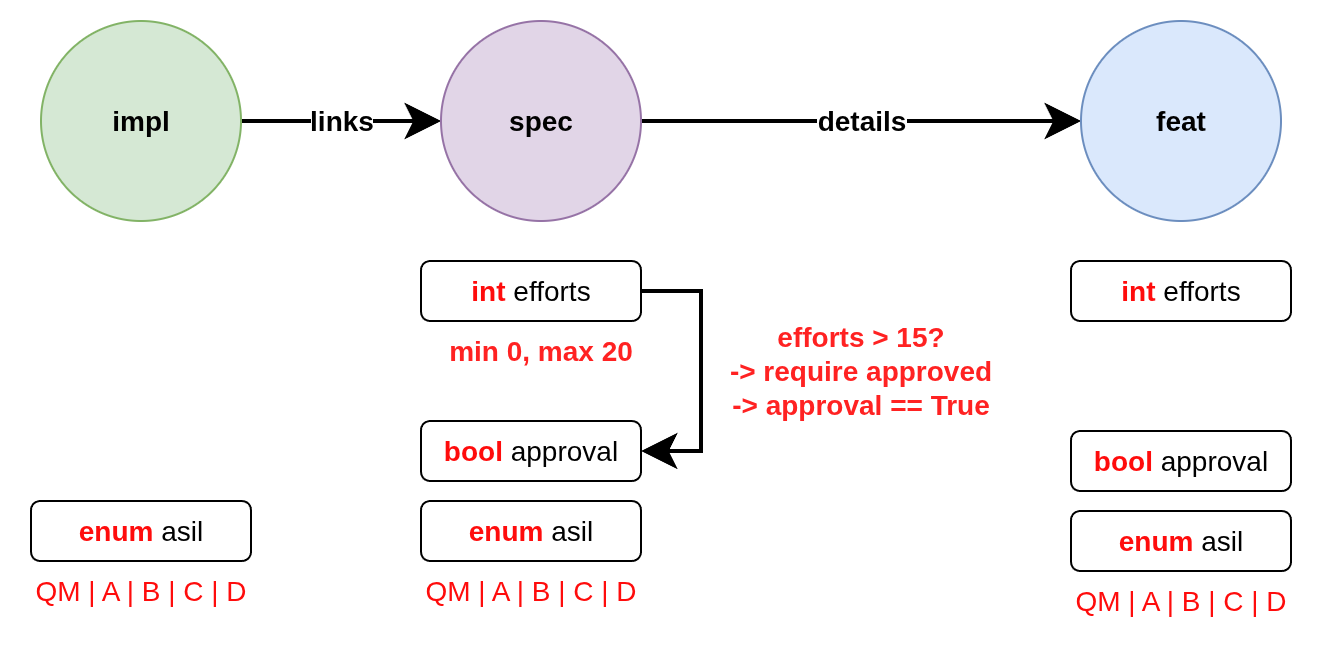
Local validation checks individual need properties without requiring information from other needs:
the
effortsfieldis of type integer
is optional for
specandfeatand disallowed forimplhas a minimum value of 0
has a maximum value of 20
the
approvalfieldis of type boolean
is optional for
specandfeatand disallowed forimplis required in case the field
effortshas a value greater than 15; if the condition is not satisfied, the violation should be returned asviolationmust be set to
Truein case the fieldeffortshas a value greater than 15; if the condition is not satisfied, the violation should be returned aswarning
the
asilfieldis of type string
has a string subtype of
enumcan only be set to one of the following values:
QM | A | B | C | D
Example local validation schema:
{
  "$defs": {
    "type-feat": {
      "properties": {
        "type": { "const": "feat" }
      }
    },
    "type-spec": {
      "properties": {
        "type": { "const": "spec" }
      }
    },
    "type-impl": {
      "properties": {
        "type": { "const": "impl" }
      }
    },
    "safe-feat": {
      "allOf": [
        { "$ref": "#/$defs/safe-need" },
        { "$ref": "#/$defs/type-feat" }
      ]
    },
    "safe-spec": {
      "allOf": [
        { "$ref": "#/$defs/safe-need" },
        { "$ref": "#/$defs/type-spec" }
      ]
    },
    "safe-impl": {
      "allOf": [
        { "$ref": "#/$defs/safe-need" },
        { "$ref": "#/$defs/type-impl" }
      ]
    },
    "safe-need": {
      "properties": {
        "asil": { "enum": ["A", "B", "C", "D"] }
      },
      "required": ["asil"]
    },
    "high-efforts": {
      "properties": {
        "efforts": { "minimum": 15 }
      },
      "required": ["efforts"]
    }
  },
  "schemas": [
    {
      "id": "impl",
      "select": {
        "$ref": "#/$defs/type-impl"
      },
      "validate": {
        "local": {
          "properties": {
            "id": { "pattern": "^IMPL_[a-zA-Z0-9_-]*$" },
            "links": {},
            "asil": {}
          },
          "unevaluatedProperties": false
        }
      }
    },
    {
      "id": "spec",
      "select": {
        "$ref": "#/$defs/type-spec"
      },
      "validate": {
        "local": {
          "properties": {
            "id": { "pattern": "^SPEC_[a-zA-Z0-9_-]*$" },
            "efforts": { "minimum": 0, "maximum": 20 },
            "approval": {},
            "asil": {},
            "details": {}
          },
          "unevaluatedProperties": false
        }
      }
    },
    {
      "id": "feat",
      "select": {
        "$ref": "#/$defs/type-feat"
      },
      "validate": {
        "local": {
          "properties": {
            "id": { "pattern": "^FEAT_[a-zA-Z0-9_-]*$" },
            "efforts": { "minimum": 0, "maximum": 20 },
            "approval": {},
            "asil": {},
            "details": {}
          },
          "unevaluatedProperties": false
        }
      }
    },
    {
      "id": "spec-approval-required",
      "severity": "violation",
      "message": "Approval required due to high efforts",
      "select": {
        "allOf": [
          { "$ref": "#/$defs/high-efforts" },
          { "$ref": "#/$defs/type-spec" }
        ]
      },
      "validate": {
        "local": {
          "required": ["approval"]
        }
      }
    },
    {
      "id": "spec-approval-not-given",
      "severity": "warning",
      "message": "Approval not given",
      "select": {
        "allOf": [
          { "$ref": "#/$defs/type-spec" },
          { "$ref": "#/$defs/high-efforts" }
        ]
      },
      "validate": {
        "local": {
          "properties": {
            "approval": { "const": true }
          },
          "required": ["approval"]
        }
      }
    },
  ]
}
Above conditions can all be checked locally on need level which allows instant user feedback in IDE extensions such as ubCode.
Network validation
On the other hand, network checks require information from other needs:
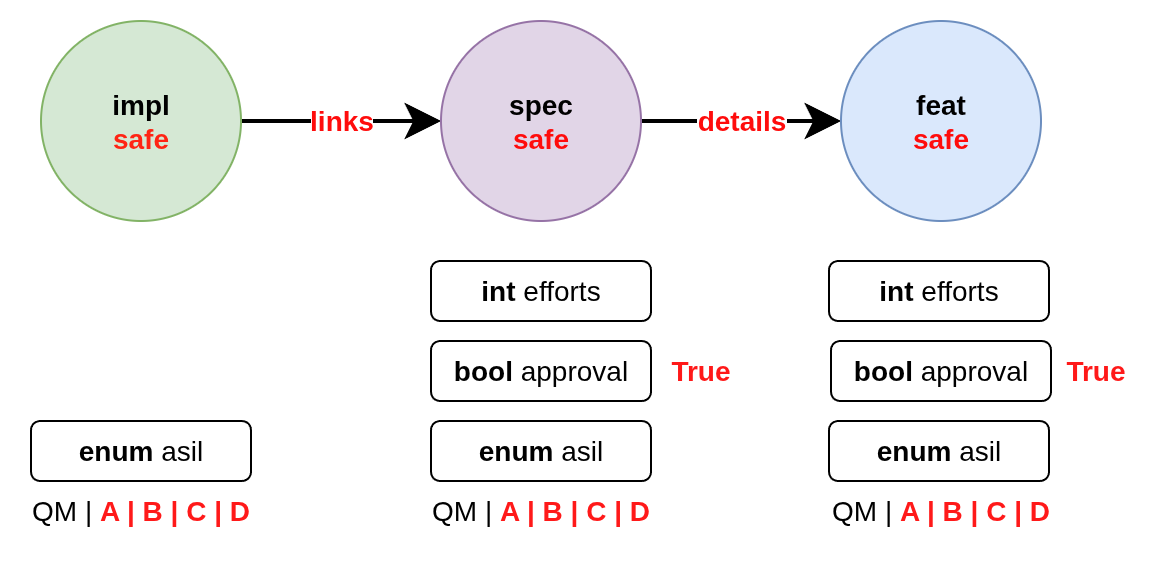
After network resolution, the following checks can be performed:
a ‘safe’
implthat has anasilofA | B | C | Dcannotlinktospecitems that have anasilofQMa safe
implcan only link approvedspecitems with link typelinksa safe
speccan only link to safe and approvedfeatitems with link typedetailsa safe
implcan link to one or more safespecitemsa spec can only link to exactly one
featadditional links to non-validating items are not allowed (that is the min/max constraints are met but there are failing additional link targets)
Example:
{
  "$defs": {
    "type-feat": {
      "properties": {
        "type": { "const": "feat" }
      }
    },
    "type-spec": {
      "properties": {
        "type": { "const": "spec" }
      }
    },
    "type-impl": {
      "properties": {
        "type": { "const": "impl" }
      }
    },
    "safe-feat": {
      "allOf": [
        { "$ref": "#/$defs/safe-need" },
        { "$ref": "#/$defs/type-feat" }
      ]
    },
    "safe-spec": {
      "allOf": [
        { "$ref": "#/$defs/safe-need" },
        { "$ref": "#/$defs/type-spec" }
      ]
    },
    "safe-impl": {
      "allOf": [
        { "$ref": "#/$defs/safe-need" },
        { "$ref": "#/$defs/type-impl" }
      ]
    },
    "safe-need": {
      "properties": {
        "asil": { "enum": ["A", "B", "C", "D"] }
      },
      "required": ["asil"]
    },
  },
  "schemas": [
    {
      "id": "safe-spec-[details]->safe-feat",
      "message": "Safe spec details safe feat",
      "select": {
        "$ref": "#/$defs/safe-spec"
      },
      "validate": {
        "network": {
          "details": {
            "contains": {
              "local": {
                "$ref": "#/$defs/safe-feat"
              }
            },
            "minContains": 1,
            "maxContains": 1
          }
        }
      }
    },
    {
      "id": "safe-impl-[links]->safe-spec",
      "message": "Safe impl links to safe spec",
      "select": {
        "$ref": "#/$defs/safe-impl"
      },
      "validate": {
        "network": {
          "links": {
            "contains": {
              "local": {
                "$ref": "#/$defs/safe-spec"
              }
            },
            "minContains": 1
          }
        }
      }
    }
  ]
}
Network validation supports various constraints on linked needs:
Link count constraints
validate.local.properties.<link>.minItems: Minimum number of links requiredvalidate.local.properties.<link>.maxItems: Minimum number of links requiredvalidate.network.<link>.minContains: Minimum number of valid links requiredvalidate.network.<link>.maxContains: Maximum number of valid links allowed
minItems and maxItems are located under local, as a link field is always a list of
need IDs (strings) on local level. That is enough to validate the number of links.
minContains and maxContains are located under network, as they validate the actual
need objects that are linked.
{
  "validate": {
    "network": {
      "links": {
        "contains": {
          "local": {
            "properties": {
               "type": { "const": "spec" },
               "asil": { "enum": ["A", "B", "C", "D"] }
            },
            "required": ["type", "asil"]
          }
        },
        "minContains": 1, // At least one link validates 'contains'
        "maxContains": 3  // Maximum three links validate 'contains'
      }
    }
  }
}
The items property can be used to define validation rules that must be satisfied
for all linked needs:
{
  "validate": {
    "network": {
      "links": {
        "items": {
          "local": {
            "properties": {
              "status": { "const": "approved" }
            }
          }
        }
      }
    }
  }
}
Nested network validation
Network validation can be nested to validate multi-hop link chains:
{
  "id": "safe-impl-chain",
  "select": {
    "$ref": "#/$defs/safe-impl"
  },
  "validate": {
    "network": {
      "links": {
        "contains": {
          "local": {
            "$ref": "#/$defs/safe-spec"
          },
          "network": {
            "links": {
              "contains": {
                "local": {
                  "$ref": "#/$defs/safe-feat"
                }
              },
              "minContains": 1
            }
          }
        },
        "minContains": 1
      }
    }
  }
}
This validates that:
A safe implementation links to safe specifications
Those specifications in turn link to safe features
Both link levels have minimum count requirements
Important
Network validation recursion limit
Nested network validation has a maximum recursion depth of 4 levels to prevent
performance issues and infinite loops. This means you can validate chains up to 4 hops deep
(e.g., impl → spec → feat → requirement).
If validation exceeds this limit, an error will be raised:
Maximum network validation recursion level 4 reached.
For most use cases, 4 levels of nesting is sufficient. If you need deeper validation chains, consider restructuring your validation logic or link relationships.
Severity levels
The schema validation supports three severity levels for reporting violations:
info: A non-critical constraint violation indicating an informative message.warning: A non-critical constraint violation indicating a warning.violation: A constraint violation.
The specific severity value has no impact on the validation, but it can influence how violations are reported to the user. See Running validation and understanding errors for more details how Sphinx console output can be configured and how to suppress errors.
Schema violations are categorised with message types. Each
message type is assigned a default severity of violation.
The default can be overwritten in schema rules.
Schema components reference
This section provides detailed documentation of all components that can be used within a schema
definition in the schemas array. These components work together to define selection criteria,
validation rules, and error handling.
Select criteria
The select section defines which needs the schema applies to:
{
  "select": {
    "allOf": [
      { "$ref": "#/$defs/type-spec" },
      { "$ref": "#/$defs/high-efforts" }
    ]
  }
}
If no select is provided, the schema applies to all needs.
select is always a local validation, meaning it only checks properties of the need itself.
select validation also means all link fields are list of need ID strings, not need objects.
Validation rules
The validate section contains the actual validation rules:
Local validation checks individual need properties:
{
  "validate": {
    "local": {
      "properties": {
        "status": { "enum": ["open", "closed", "in_progress"] }
      },
      "required": ["status"]
    }
  }
}
local validation also means all link fields are list of need ID strings, not need objects.
Unevaluated properties control
The unevaluatedProperties property controls whether properties not explicitly defined in the
schema are allowed:
{
  "validate": {
    "local": {
      "properties": {
        "status": { "enum": ["open", "closed"] }
      },
      "unevaluatedProperties": false // Only 'status' property allowed
    }
  }
}
When unevaluatedProperties: false is set and a need has additional properties,
validation will report:
Schema message: Unevaluated properties are not allowed ('comment', 'priority' were unexpected)
This is useful for enforcing strict property schemas and catching typos in property names. To find out which properties are actually set, the validated needs are reduced to field values that are not on their default value.
unevaluatedProperties with allOf
The unevaluatedProperties validation also works with properties defined in allOf constructs.
Properties from all schemas in the allOf array are considered as evaluated:
{
  "validate": {
    "local": {
      "properties": { "asil": {} },
      "unevaluatedProperties": false,
      "allOf": [
         { "properties": { "comment": {} } }
      ]
    }
  }
}
In this example, both asil and comment properties are considered evaluated, so only these
two properties would be allowed on the need. Empty schemas for a field are allowed to mark
them as evaluated. The behavior is aligned with the JSON Schema specification.
Required vs unevaluated properties
The required list has no impact on unevaluatedProperties validation.
Properties listed in required must still be explicitly defined in properties or pulled
in via allOf to be considered evaluated:
{
  "validate": {
    "local": {
      "properties": { "status": {} },
      "required": ["status", "priority"], // priority not in properties
      "unevaluatedProperties": false
    }
  }
}
In this case, a need with a priority property would still trigger an unevaluated properties
error, even though priority is in the required list.
Rule severity
Each schema rule can specify one of the severity levels info, warning, or
violation as described in Severity levels. If not given, violation is used as
a default.
The severity influences how validation failures are displayed in the console.
{
  "severity": "warning",
  "select": {
    "properties": { "type": { "const": "feat" } }
  },
  "validate": {
    "local": {
      "properties": { "id": { "pattern": "^FEAT_[a-zA-Z0-9_-]*$" } }
    }
  }
},
{
  "select": {
    "properties": { "type": { "const": "spec" } }
  },
  "validate": {
    "local": {
      "properties": { "id": { "pattern": "^SPEC_[a-zA-Z0-9_-]*$" } }
    }
  }
}
Console output for above example:
WARNING: Need 'FEAT' has schema warnings:
  Severity:       warning
  Field:          id
  Need path:      FEAT
  Schema path:    [0] > local > properties > id > pattern
  Schema message: 'FEAT' does not match '^FEAT_[a-zA-Z0-9_-]*$' [sn_schema_warning.local_fail]

ERROR: Need 'SPEC' has schema violations:
  Severity:       violation
  Field:          id
  Need path:      SPEC
  Schema path:    [1] > local > properties > id > pattern
  Schema message: 'SPEC' does not match '^SPEC_[a-zA-Z0-9_-]*$' [sn_schema_violation.local_fail]
Note how the FEAT report has a severity warning while SPEC is reported as violation.
This is because the first schema explicitly set the severity to warning, while the second
schema used the default violation.
Schema definitions ($defs)
Reusable schema components can be defined in the $defs section:
{
  "$defs": {
    "type-feat": {
      "properties": {
        "type": { "const": "feat" }
      }
    },
    "safe-need": {
      "properties": {
        "asil": { "enum": ["A", "B", "C", "D"] }
      },
      "required": ["asil"]
    },
    "safe-feat": {
      "allOf": [
        { "$ref": "#/$defs/safe-need" },
        { "$ref": "#/$defs/type-feat" }
      ]
    }
  }
}
A full example is outlined in the Local validation section.
The key $ref must appear as the only key in the schema where it is used.
Recursive references are not allowed, i.e. a schemas cannot directly or indirectly reference itself.
Supported data types and constraints
Sphinx-Needs supports comprehensive data type validation for need options through JSON Schema. The following data types are available for need options and are defined in needs_fields. These types must be specified for fields before they can be validated in schemas.
String type
String fields store textual data with optional format validation:
{
  "properties": {
    "description": {
      "type": "string",
      "minLength": 10,
      "maxLength": 500
    }
  }
}
The following schema constraints are supported for string fields:
minLength/maxLength: Minimum and maximum length of the stringpattern: Regex pattern that the string must match (see Regex Restrictions)format: Predefined string formats (see below)enum: Enumerated set of allowed string valuesconst: Exact allowed string value
String formats
String fields can be validated against specific formats using the format property:
Date and time formats (ISO 8601)
{
  "properties": {
    "start_date": {"type": "string", "format": "date"},          // 2023-12-25
    "created_at": {"type": "string", "format": "date-time"},     // 2023-12-25T14:30:00Z
    "meeting_time": {"type": "string", "format": "time"},        // 14:30:00
    "project_duration": {"type": "string", "format": "duration"} // P1Y2M10DT2H30M
  }
}
Communication formats
{
  "properties": {
    "contact_email": {"type": "string", "format": "email"}, // user@example.com (RFC 5322)
    "project_url": {"type": "string", "format": "uri"},     // https://example.com (RFC 3986)
    "tracking_id": {"type": "string", "format": "uuid"}     // 123e4567-e89b-12d3-a456-426614174000 (RFC 4122)
  }
}
Enumerated values
{
  "properties": {
    "priority": {
      "type": "string",
      "enum": ["low", "medium", "high", "critical"]
    }
  }
}
Regex pattern restrictions
When using pattern for string validation, regex patterns must be compatible across Python,
Rust, and SQLite engines used in the Sphinx-Needs ecosystem.
Prohibited constructs:
Lookaheads/Lookbehinds:
(?=pattern),(?!pattern),(?<=pattern),(?<!pattern)Backreferences:
\1,\2, etc.Nested quantifiers:
(a+)+,(a*)*(can cause catastrophic backtracking)Possessive quantifiers:
a++,a*+(not supported in all engines)Atomic groups:
(?>pattern)(not supported in all engines)Recursive patterns:
(?R)(not supported in all engines)
Safe patterns:
{
  "properties": {
    "id": { "pattern": "^[A-Z0-9_]+$" },           // ✓ Safe
    "version": { "pattern": "^v[0-9]+\\.[0-9]+$" }, // ✓ Safe
    "status": { "pattern": "^(open|closed)$" }      // ✓ Safe
  }
}
Unsafe patterns:
{
  "properties": {
    "id": { "pattern": "^(?=.*[A-Z]).*$" },      // ✗ Lookahead
    "ref": { "pattern": "^(\\w+)_\\1$" },        // ✗ Backreference
    "complex": { "pattern": "^(a+)+$" }          // ✗ Nested quantifiers
  }
}
The validation will reject schemas containing unsafe patterns with clear error messages.
Integer type
Integer fields store whole numbers with optional range constraints:
{
  "properties": {
    "efforts": {
      "type": "integer",
      "minimum": 0,
      "maximum": 100,
      "multipleOf": 5
    }
  }
}
The following schema constraints are supported for integer fields:
minimum/maximum: Minimum and maximum value of the integerexclusiveMinimum/exclusiveMaximum: Exclusive minimum and maximum valuemultipleOf: Value must be a multiple of this numberenum: Enumerated set of allowed integer valuesconst: Exact allowed integer value
Number type
Number fields store floating-point values:
{
  "properties": {
    "cost_estimate": {
      "type": "number",
      "minimum": 0.0,
      "exclusiveMaximum": 1000000.0
    }
  }
}
The following schema constraints are supported for number fields:
minimum/maximum: Minimum and maximum value of the numberexclusiveMinimum/exclusiveMaximum: Exclusive minimum and maximum valuemultipleOf: Value must be a multiple of this numberenum: Enumerated set of allowed number valuesconst: Exact allowed number value
Boolean type
Boolean fields store true/false values with flexible input handling:
{
  "properties": {
    "approval": {"type": "boolean"},
    "is_critical": {"type": "boolean", "const": true}
  }
}
Accepted boolean values:
Truthy:
true,yes,y,on,1,True,Yes,OnFalsy:
false,no,n,off,0,False,No,Off
The enum keyword cannot be used for booleans as const is functionally equivalent and
more expressive.
Array type
Array fields store lists of homogeneous typed values:
{
  "properties": {
    "tags": {
      "type": "array",
      "items": {"type": "string"},
      "minItems": 1,
      "maxItems": 10
    },
    "priorities": {
      "type": "array",
      "items": {"type": "integer"},
      "minItems": 1
    },
    "approvals": {
      "type": "array",
      "items": {"type": "boolean"}
    }
  }
}
Array properties:
items: Schema for all array elements (required). The dictionary can contain any of the basic type schemas outlined above. Theitems.typefield is required.uniqueItems: If set totrue, all elements in the array must be unique.minItems/maxItems: Array size constraintscontainsSchema for some elements in the array. The dictionary can contain any of the basic type schemas outlined above.minContains/maxContains: Constraints on number of elements matchingcontains;If
minContainsis not given, it defaults to 1 whencontainsis present.If
maxContainsis not given, there is no upper limit.
Running validation and understanding errors
After defining your schema configuration, running Sphinx will validate all needs against the defined schemas. This section explains the validation process and how to interpret errors.
Error messages and output
Validation errors include detailed information:
Severity: The severity level of the violation
Field: The specific field that failed validation
Need path: The ID of the need that failed or the link chain for network validation. Link chains are represented as in
IMPL_SAFE > links > SPEC_SAFE > specifies > FEAT_SAFE, so need IDs and link types form the chain, separated by>.Schema path: The JSON path within the schema that was violated. The path starts with an identifier built from the schema rule id and the 0-based index of the rule in the list. Examples:
   [0] > local > properties > id > pattern
   spec[1] > local > properties > id > pattern

The first example has no schema rule ID defined, so only the index is used.
User message: Optional user-friendly message set in the schema rules.
Schema message: Detailed technical validation message from the validator
Example error output:
Need 'SPEC_P01' has validation errors:
  Severity:       violation
  Field:          id
  Need path:      SPEC_P01
  Schema path:    spec[1] > local > properties > id > pattern
  Schema message: 'SPEC_P01' does not match '^REQ[a-zA-Z0-9_-]*$'
For nested network validation, it can be difficult to determine which constraint and need caused the error in the chain. In such cases, the error will emit details about the failed need and the specific link that caused the issue:
WARNING: Need 'IMPL_SAFE' has validation errors:
  Severity:       violation
  Need path:      IMPL_SAFE > links
  Schema path:    safe-impl-[links]->safe-spec-[links]->safe-req[0] > validate > network > links
  User message:   Safe impl links to safe spec links to safe req
  Schema message: Too few valid links of type 'links' (0 < 1) / nok: SPEC_SAFE

    Details for SPEC_SAFE
    Need path:      IMPL_SAFE > links > SPEC_SAFE > links
    Schema path:    safe-impl-[links]->safe-spec-[links]->safe-req[0] > links > validate > network > links
    Schema message: Too few valid links of type 'links' (0 < 1) / nok: REQ_UNSAFE

      Details for REQ_UNSAFE
      Field:          asil
      Need path:      IMPL_SAFE > links > SPEC_SAFE > links > REQ_UNSAFE
      Schema path:    safe-impl-[links]->safe-spec-[links]->safe-req[0] > links > links > local > allOf > 0 > properties > asil > enum
      Schema message: 'QM' is not one of ['A', 'B', 'C', 'D'] [sn_schema.network_contains_too_few]
Severity handling
The Severity levels affect how Sphinx emits validation messages. Here is how they map to Sphinx logging levels and console output.
Schema severity info:
Mapped to Sphinx logging level
warningDisplayed as
WARNING:in red color in consoleLogged with type
sn_schema_info
Schema severity warning:
Mapped to Sphinx logging level
warningDisplayed as
WARNING:in red color in consoleLogged with type
sn_schema_warning
Schema severity violation:
Mapped to Sphinx logging level
errorDisplayed as
ERROR:in dark red color in consoleLogged with type
sn_schema_violation
Besides the type information mentioned above, log messages also receive a
subtype described in Message types.
The output format is WARNING|ERROR: <message> [type.subtype].
The combination of type and subtype can be used to selectively
suppress validation messages.
Message types
The schema validation is done on local or network level. Accordingly, the following message subtypes are used to indicate which validation failed.
Local validation:
field_fail: Field schema validation failed (local validation, defined viaschemakey in needs_fields)extra_link_fail: Extra link schema validation failed (defined viaschemakey in needs_extra_links)local_fail: Need-local validation failed (defined viavalidate.localin schemas of needs_schema_definitions)
Network validation:
network_missing_target: Outgoing link target cannot be resolvednetwork_contains_too_few: Not enough valid links (minContains failed)network_contains_too_many: Too many valid links (maxContains failed)network_items_fail: Linked need’s item validation failed
If not overridden in the schema rules, a default severity of violation
is used for all message types.
Suppressing validation messages
Schema validation messages can be selectively suppressed using Sphinx’s suppress_warnings configuration option.
Examples:
Suppress all schema violation errors:
suppress_warnings = ["sn_schema_violation"]
Suppress all schema warnings:
suppress_warnings = ["sn_schema_warning"]
Suppress specific validation rule failures:
# Suppress only local validation failures for violations
suppress_warnings = ["sn_schema_violation.local_fail"]

# Suppress only network link count issues for warnings
suppress_warnings = ["sn_schema_warning.network_contains_too_few"]
Suppress multiple specific types:
suppress_warnings = [
    "sn_schema_violation.local_fail",
    "sn_schema_warning.field_fail",
    "sn_schema_info",  # Suppress all info messages
]
Note
Suppressing validation messages does not prevent the validation from occurring; it only hides the output. All violations will still be recorded in the schema violation report (see Schema violation report JSON file).
Schema violation report JSON file
Schema violations are also stored in a schema_violations.json file under the output directory.
Example
{
  "validation_summary": "Schema validation completed with 2 warning(s) in 0.002 seconds. Validated 1368 needs/s.",
  "validated_needs_per_second": 1368,
  "validated_needs_count": 3,
  "validation_warnings": {
    "FEAT_unsafe": [
      {
        "log_lvl": "warning",
        "type": "sn_schema",
        "subtype": "local_fail",
        "details": {
          "severity": "violation",
          "field": "id",
          "need_path": "FEAT_unsafe",
          "schema_path": "[0] > local > properties > id > pattern",
          "user_msg": "id must be uppercase with numbers and underscores",
          "validation_msg": "'FEAT_unsafe' does not match '^[A-Z0-9_]+$'"
        },
        "children": []
      }
    ],
    "IMPL_SAFE": [
      {
        "log_lvl": "warning",
        "type": "sn_schema",
        "subtype": "network_local_fail",
        "details": {
          "severity": "violation",
          "field": "asil",
          "need_path": "IMPL_SAFE > links > SPEC_UNSAFE",
          "schema_path": "safe-impl-[links]->safe-spec[7] > links > local > allOf > 0 > properties > asil > enum",
          "validation_msg": "'QM' is not one of ['A', 'B', 'C', 'D']"
        },
        "children": []
      }
    ]
  }
}
Best practices
Use descriptive IDs: Give your schemas meaningful IDs for easier debugging
Leverage $defs: Define reusable schema components to avoid duplication
Start with warnings: Use
warningseverity during development, then upgrade toviolationProvide clear messages: Include helpful
messagefields to guide usersTest incrementally: Add schemas gradually to avoid overwhelming validation errors
Use select wisely: Only apply schemas to relevant need types using
select
Migration from legacy validation
The schema validation system is designed to replace the older needs_constraints and needs_warnings configuration options, offering significant advantages:
Declarative: JSON-based configuration instead of Python code
Powerful: Supports selection, local, and network validation
Performance: Schema validation is faster than custom validations written in Python
IDE support: Full IntelliSense and validation in supported editors like ubCode
Type safety: Strong typing with comprehensive data type support
Network validation: Multi-hop link validation capabilities
Maintainability: Easier to read, write, and version control
Migration examples
From needs_constraints:
# Old approach - needs_constraints
needs_constraints = {
    "security": {
        "check_0": "'security' in tags",
        "severity": "CRITICAL"
    },
    "critical": {
        "check_0": "'critical' in tags",
        "severity": "CRITICAL",
        "error_message": "need {{id}} does not fulfill CRITICAL constraint"
    }
}
{
  "schemas": [
    {
      "id": "security-constraint",
      "severity": "violation",
      "message": "Security needs must have security tag",
      "select": {
        "properties": {
          "tags": {
            "type": "array",
            "contains": {"const": "security"}
          }
        }
      },
      "validate": {
        "local": {
          "properties": {
            "tags": {
              "type": "array",
              "contains": {"const": "security"}
            }
          }
        }
      }
    }
  ]
}
From needs_warnings:
needs_warnings = {
    "invalid_status": "status not in ['open', 'closed', 'done']",
}
{
  "schemas": [
    {
      "id": "valid-status",
      "severity": "warning",
      "message": "Status must be one of the allowed values",
      "validate": {
        "local": {
          "properties": {
            "status": {
              "enum": ["open", "closed", "done"]
            }
          },
          "required": ["status"]
        }
      }
    }
  ]
}
Network validation benefits
The schema system provides capabilities not available in the legacy system:
{
  "schemas": [
    {
      "id": "safe-implementation-links",
      "message": "Safe implementations must link to approved specifications",
      "select": {
        "allOf": [
          {"$ref": "#/$defs/type-impl"},
          {"$ref": "#/$defs/safety-critical"}
        ]
      },
      "validate": {
        "network": {
          "links": {
            "contains": {
              "local": {
                "allOf": [
                  {"$ref": "#/$defs/type-spec"},
                  {"properties": {"approval": {"const": true}}}
                ]
              }
            },
            "minContains": 1
          }
        }
      }
    }
  ]
}
This type of multi-need relationship validation was not possible with the legacy constraint and warning systems.
Recommended migration path
Audit existing constraints and warnings: Review your current validation rules
Start with local validations: Convert simple property checks first
Leverage network validation: Replace complex Python logic with declarative schemas
Test incrementally: Validate schemas work as expected before removing legacy rules
Update documentation: Ensure team members understand the new validation approach
Learning from examples
The Sphinx-Needs test suite contains comprehensive examples demonstrating schema validation in real-world scenarios. These tests are excellent learning resources showing various validation patterns and their expected outcomes.
Test fixtures
The YAML-based test fixtures contain complete, self-contained project examples with:
Full
conf.pyorubproject.tomlconfigurationSchema definitions in
schemas.jsonSample RST files demonstrating the schemas in action
Various validation scenarios (passing and failing)
Each fixture is a working example you can study and adapt for your own projects.
Snapshot testing results
The tests use snapshot testing to verify validation behavior. The expected outputs and error messages can be found in the test snapshots.
These snapshots show:
Expected validation errors for specific scenarios
Error message formatting and content
Different severity levels and their output
Network validation chain details
By examining both the fixtures (input) and snapshots (expected output), you can understand how schemas work in practice and what validation errors look like for different scenarios.